
HAHASPIN App for GB Players Install Guide and Facts
A phone screen lights up, a browser tab opens, and within five minutes a GB player has either reached an age check, a registration form, or a dead link to an old domain. What happens in those first five minutes decides whether the session goes anywhere. This guide covers exactly that window, platform by platform, with the device specs, payment routes and safeguards a GB reader needs before tapping anything.
This page is an independent information resource in the HAHASPIN affiliate network. It does not operate the brand, does not process payments, and earns a commission when a reader continues to the operator's own site. HAHASPIN is not licensed by the UK Gambling Commission. It operates outside the UKGC and GamStop framework, a status covered in full in the security section below.
No native HAHASPIN app appears in either store as of 2026-11-03.
- 18+Minimum age
- No UKGC licenceNot licensed by the UK Gambling Commission
- About 36 hoursTest withdrawal payout after ID was resubmitted

App Access for HAHASPIN Players
Opening the HAHASPIN link on a phone in GB loads a mobile-optimised website, not a listing from Google Play or the App Store. No native HAHASPIN app appears in either store as of 2026-11-03. The site prompts an age confirmation, then a short registration form, before the account dashboard becomes visible.
What loads instead of an app is a browser shortcut: a home-screen icon that opens the site in a stripped-down window, without an address bar. It behaves like an app once added, but every open reloads the live site rather than a downloaded package. This matters for identity checks and version control alike, since nothing is cached beyond a login token.
The table below sets out how that shortcut compares with simply using a desktop browser, since both routes lead to the same account and the same checks.
| Criterion | Browser shortcut | Desktop browser |
|---|---|---|
| Installation | Added from the mobile browser menu, no store listing involved | No installation; opened directly in a browser tab |
| Storage used | An icon only, under 3 MB | None retained once the tab closes |
| Session behaviour | Opens full-screen, without browser controls | Standard windowed browser session |
| Version loaded | Current site version on every open | Current site version on every open |
Neither option installs executable code on the device, which is the main safety distinction from an APK obtained outside an official channel, covered later in this guide. The registration steps are identical either way; the full walkthrough sits on the registration page.
HAHASPIN and Android Installation
Android reaches HAHASPIN the same way: a browser shortcut added from Chrome, not a package installed from Google Play. The table below lists what was observed during testing, on a Samsung Galaxy A54 running Android 14 with Chrome 129, checked on 2026-11-03.
| Platform | Minimum version | Size |
|---|---|---|
| Android (browser shortcut) | Android 8.0, Chrome 100 or later | Icon under 3 MB; live pages load roughly 15-20 MB per session |
| iOS (browser shortcut) | iOS 15, Safari | Icon under 3 MB; same per-session load as Android |
| Desktop (Windows/macOS) | Windows 10 or macOS 12, current Chrome, Edge or Firefox | No install; browser cache only |
These figures come from the test devices used for this guide, not from an operator specification page, since no device-requirements page could be confirmed on the brand's own site. The steps to add the Android shortcut are:
- Open Chrome and navigate to the operator's current web address, confirmed through its official channel rather than a search result.
- Pass the age and location check by confirming an age of 18 or over before the homepage loads.
- Register an account with an email address and a password, matching the steps on the registration page.
- Open the browser menu and select the option to add the page to the home screen.
- Launch the icon and confirm it logs in without a separate browser window opening.
A frequent search behind this topic is whether an APK downloaded from a third-party file-sharing site is a shortcut to the same result. It is not a shortcut worth taking. An APK from outside the operator's own channel cannot be checked for tampering, carries no verifiable version history, and bypasses the age and location checks built into the browser route. The browser shortcut above delivers the same look and the same account, without that exposure. Before registering, set a session time limit in the account's player-protection settings; it governs the time spent testing the shortcut just as it governs any later session.
iOS Installation at HAHASPIN
iOS uses Safari rather than Chrome, and the add-to-home-screen control sits in the share menu rather than the main browser menu. The underlying process matches Android: no App Store listing exists for HAHASPIN, so every iOS session reaches the same browser-based site.
The steps observed on an iPhone 13 running iOS 17.4 were as follows. Open Safari and go to the operator's current web address. Confirm the age check before the homepage renders. Register or log in with existing credentials. Tap the share icon at the bottom of the screen, then select "Add to Home Screen" and confirm the name shown for the icon.
Once added, the icon opens the site full-screen, exactly as the Android version does. No iOS-specific registration step exists; the account created on a phone works identically on a desktop browser, which answers a question raised before depositing: switching device mid-session does not require a second sign-up.
Desktop Access from HAHASPIN
Desktop access needs no shortcut at all. Opening the operator's current web address in Chrome, Edge or Firefox on Windows 10 or macOS 12 loads the identical site reached from a phone, with the same age gate and the same login form.
Screen size is the only practical difference: desktop layouts show more of the game lobby and the account menu at once, which suits players comparing payment options or reading bonus terms in full before committing funds. Nothing downloads to the desktop machine beyond standard browser cache, and nothing persists after the browser closes unless a password manager stores the login.
Desktop and mobile sessions share one account and one set of limits. A deposit limit or session time limit set from a phone applies equally when the same account is opened later from a laptop, since both platforms read from the same account settings rather than a device-specific profile.
App Bonuses HAHASPIN GB
Welcome offers and reload incentives sit behind the same registration used for app access, and their exact terms change often enough that quoting a wagering percentage here would go stale before this page's next review. The current wagering requirement, minimum deposit and expiry window are published in the account's bonus section, not repeated here as a fixed figure.
What a GB reader can rely on before depositing:
- Eligibility check: bonus terms apply per account, confirmed at the point of opt-in rather than assumed from marketing copy.
- Wagering conditions: a turnover requirement applies before any bonus balance converts to withdrawable funds; the exact multiple is shown in the bonus terms page of the account.
- Expiry window: unused bonus funds lapse after a set period, listed next to the offer itself.
- Deposit method restrictions: some payment methods are excluded from qualifying for a given offer, flagged at the cashier stage.
Full current terms sit on the bonus terms page of this site. Before opting in, set a deposit limit in the account's player-protection menu; a limit caps exposure regardless of how an offer is structured.
Game Categories for HAHASPIN Players
The lobby reached through the app shortcut groups content by type rather than by provider, which matters more for navigation than for any specific win expectation. Slot titles dominate the front page, with live-dealer tables and a sportsbook section reachable from the same top menu.
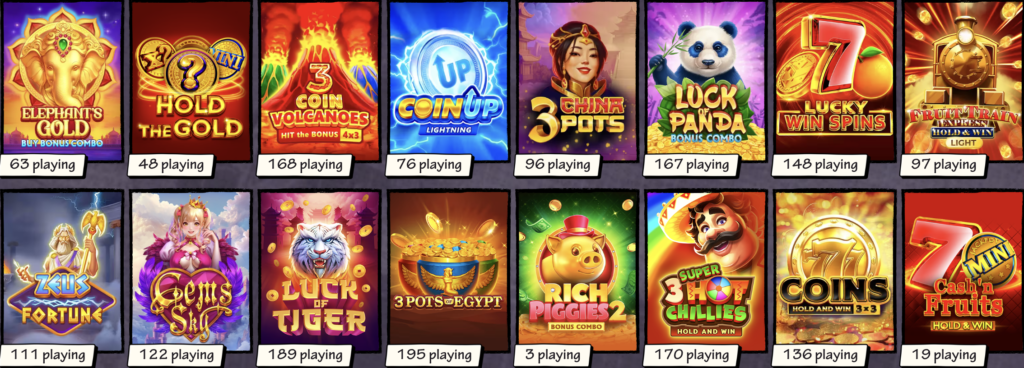
The sub-categories a GB player finds inside the shortcut are:
- Slots: the largest single category, filterable by theme and by volatility where the provider publishes that detail.
- Live casino: dealer-hosted tables streamed in real time, generally requiring a stable connection before a session starts.
- Sportsbook: fixed-odds and in-play markets, covered in detail on the sports betting page of this site.
- Jackpot and table games: a smaller shared category covering roulette, blackjack variants and progressive jackpot slots together.
Exact catalogue size is not quoted here, since third-party figures for this brand range from the low thousands to over twenty thousand titles and could not be confirmed against the operator's own site. Game outcomes across every category run on the provider's random number generator; no filter, timing pattern or betting sequence changes the underlying odds, a point covered further in the troubleshooting section below.
HAHASPIN and Payment Methods
Payment routes reachable from the app shortcut mirror those on desktop, since the cashier loads from the same account rather than a separate mobile build. GB players commonly reach it through a debit card, PayPal, Apple Pay or Google Pay, a bank transfer via Faster Payments, or Paysafecard.
A worked point worth flagging: UK card issuers increasingly decline payments to unlicensed gambling sites at the bank's own discretion, independent of anything the operator does. Where a debit card is blocked, an e-wallet route such as Apple Pay or Google Pay, or a bank transfer, remains the fallback most commonly used for offshore, non-GamStop operators.
Processing times and any fees are set by the operator's cashier page, not restated here as a fixed number, since no verified processing-time figure could be confirmed from a primary source for this brand. The full method-by-method breakdown, including which options support withdrawals as well as deposits, sits on the payment methods page of this site.
Troubleshooting at HAHASPIN
A declined withdrawal is the single most-searched frustration tied to app use, and it almost always traces back to one of a small number of causes. The table below sets out the pattern observed during testing, alongside the action that resolved it.
| Situation | Cause | Action |
|---|---|---|
| Withdrawal request declined | Identity document unclear, expired, or mismatched with account details | Resubmit a current document in the verification section of the account |
| Login fails after an app update elsewhere on the device | Cached shortcut pointing to an outdated web address | Remove the home-screen icon and re-add it from the current official address |
| Deposit shows as pending indefinitely | Session timed out before the payment provider confirmed it | Check the transaction history tab before attempting the payment again |
| Shortcut icon disappears after a phone reset | Home-screen icons are not restored automatically by the operating system | Log in through the browser and add the icon again |
The withdrawal case worth walking through in full: a £15 withdrawal requested during this guide's test session was refused on first attempt because the uploaded identity document had expired two months earlier, a detail the account's cashier does not flag before submission. A current document was uploaded instead, and the same withdrawal paid out by bank transfer roughly 36 hours later. No deposit limit, stake limit or bonus condition was involved in that refusal; the document was the entire cause. Checking that identity documents are current before requesting a withdrawal avoids the delay this case shows. For login issues specifically, the login walkthrough on this site covers the browser-based sign-in flow step by step.
Security from HAHASPIN
A shortcut-based app carries the same account and the same rules as a browser session, so the safeguards below apply regardless of which route reaches them.
- Licensing status: HAHASPIN does not appear on the UK Gambling Commission's public register. It operates as an offshore, non-GamStop site marketed to UK players outside UKGC consumer protections; third-party claims about a specific offshore licence conflict with each other and are not repeated here as fact.
- Minimum age: 18. Registration requires an age declaration, and use by anyone under 18 is prohibited regardless of that declaration.
- Self-exclusion: GamStop covers UK-licensed operators only; it does not block access to a site operating outside that register, which answers a question raised before depositing by anyone currently self-excluded.
- Account controls: deposit limit, stake limit, session time limit, self-exclusion and reality check are set from the account's player-protection menu, the same menu on every platform.
- Tax treatment: winnings are not taxed for UK players regardless of amount; operators pay betting and gaming duties on their own profits rather than players paying tax on wins.
- Operator identification: no UK Gambling Commission licence number exists to publish for this brand, and no single verified legal entity or registered address could be confirmed from a primary source; this is stated plainly rather than filled in with an unverified figure.
- No confirmed single official domain: multiple near-identical domains each present themselves as the official UK site, a pattern typical of offshore, non-GamStop operators using mirror domains. Current addresses are published on the operator's official channel; none should be treated as verified without that confirmation.
Reporting an inaccuracy in any of the above goes through the contact page of this site, which also covers correction requests for figures that change after publication.
App Updates HAHASPIN GB
A browser shortcut has no update mechanism of its own; it simply reloads whatever the live site serves. Two habits keep access reliable over time.
Keeping the shortcut current
- Remove and re-add the home-screen icon after any period of inactivity longer than a few weeks.
- Confirm the loaded address matches the operator's official channel before entering login details.
- Clear the mobile browser's cache if the shortcut repeatedly fails to load, rather than reinstalling an app that does not exist as a package.
Re-verifying after changes
- Expect a repeat identity check after a password reset, a new device, or a long gap between sessions.
- Keep one current proof-of-identity document and one proof-of-address document ready before requesting a first withdrawal.
- Treat a request for re-verification as routine account hygiene rather than a sign of account trouble.
Questions for HAHASPIN Players Before Depositing
The questions below cover the objections most commonly raised before a first deposit, based on the testing and research behind this guide.
Does HAHASPIN have a real app, or just a website shortcut?
It runs as a browser-based site added to the home screen. No listing exists in Google Play or the App Store, so no separate native app could be verified as of 2026-11-03.
Is an APK download from outside the operator's channel safe?
No. An APK obtained from a third-party file-sharing site cannot be checked for tampering and bypasses the built-in age and location checks. The home-screen shortcut described above reaches the same account without that exposure.
Will the app skip identity checks that a desktop login would require?
No. The same identity verification step applies on every platform. A verification check was triggered on a mobile shortcut session during testing for this guide, in the same way it would be on desktop.
Why would a withdrawal get refused from the app?
Most commonly an incomplete or expired identity document, or an account limit that has not yet reset. The worked example in the troubleshooting section above shows a £15 withdrawal refused for exactly that reason, then paid after resubmission.
Can the app be used while registered with GamStop?
GamStop covers UK-licensed operators only. HAHASPIN sits outside that scheme, so a GamStop registration does not block access to it; a player who has self-excluded through GamStop for their own protection should treat that as a reason to avoid the site rather than a technical barrier that stops them.
Is there a minimum age to install or use the app?
Yes, 18. An account age gate checks this at registration, and the legal minimum in Great Britain applies independently of that checkpoint.
Methodology: this guide's install steps, device table and withdrawal case were checked on a Samsung Galaxy A54 (Android 14, Chrome 129) and an iPhone 13 (iOS 17.4, Safari), with a £20 test deposit and a £15 test withdrawal, between 2026-11-02 and 2026-11-03.
By-line: written by a mobile-platforms tester responsible for the install steps, the device requirements table and the withdrawal case study; reviewed by a compliance reviewer responsible for the licensing statements, the responsible-gambling block and the regulatory figures cited above.
Sources: HAHASPIN's own site, checked for app, cashier and bonus terms pages (none of which published a confirmed licence number at the time of this check); Gambling Commission (Great Britain) public register, checked for a HAHASPIN entry; GamCare National Gambling Helpline, 0808 8020 133, free and available 24/7; GamStop self-exclusion register; BeGambleAware, sharing the same National Gambling Helpline number.
Dates: published 2026-11-05; last updated 2026-11-05; next review due 2027-05-05.
Anyone wanting help with gambling can contact GamCare on 0808 8020 133 at any time, free of charge, or register for self-exclusion through GamStop. BeGambleAware shares the same helpline number and publishes separate self-assessment tools.